
Publish Banner
Publish Banner
You can save all content and configuration changes made to your banner before making them live.
To apply the changes and make the updated banner visible to your website visitors automatically, simply click the ‘Publish Banner’ button located at the top right corner of your dashboard.

Versioning and Settings History
Each time you publish a cookie banner through Cookie Wow, the system saves a version of your banner configuration.
This includes: The text displayed on the banner , banner design and styling, and the list and categories of cookies shown on the banner
You may contact the Cookie Wow team to request access to past versions and view historical settings if needed.
Forcing the Banner to Re-request Consent
Every time you publish a new banner, Cookie Wow provides an option to prompt all users to provide consent again, as shown in the image below:
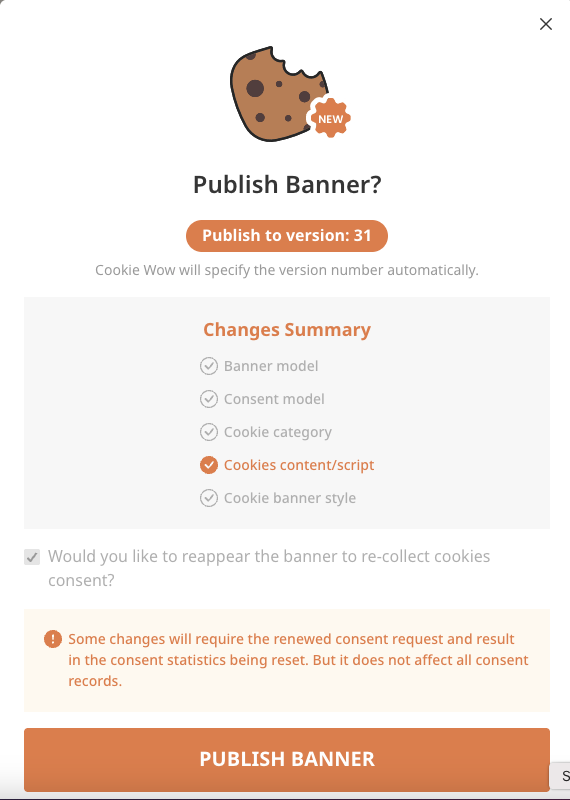
When this option is enabled, the cookie banner will appear again for all returning visitors, even if they have already provided consent in the past.
When Should You Republish to Re-request Consent?
The purpose or content of cookies in any category has been modified
The wording on the cookie banner has changed in a way that could affect user understanding or interpretation
The Privacy Policy or Cookie Policy has been updated
Related articles
See allHow to Customize Cookie Banner CSS
Users can customize the appearance of the Cookie Banner through the “Customize Banner” and “Customize CSS” menus within the Cookie Wow pl...
How to Customize Font Family
Currently, users can change the font-family of the Cookie Banner by having a developer add custom CSS to the website. For example:.cwc-co...
How to set the language of the Cookie Banner
By default, Cookie Wow automatically detects the website's language, and the cookie banner will display in that language based on the <...
Need more help?
Get in touch and we'll help solve it